A browser-based design and AI creation platform
Freepik, formerly known as Wepik, is an online design tool that lets anyone create graphics directly from a browser. It offers ready-made templates for social media posts, invitations, and more, so users can quickly make designs even without experience. Everything can be edited with simple drag-and-drop actions, and finished projects can be downloaded in just a few clicks.
Top Recommended Alternative

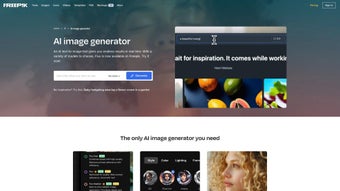
Today, it also includes helpful AI features that make the design process even faster. Users can generate images from text prompts, improve picture quality, and create different variations of an image. These tools add flexibility and creativity, though some advanced options may require a paid plan.
Creative features, AI tools, and alternatives
Freepik provides thousands of customizable templates and a simple editor that beginners can learn quickly. Its AI Image Generator turns short descriptions into images, while the AI Reimagine and AI Upscaler tools help users refine photos or create new versions of an existing design. These features give users more creative control, though free users may run into limits on downloads or advanced tools.
The platform’s interface is straightforward and friendly, making it easy for beginners to explore different layouts, styles, and design elements. AI tools help speed up the creation process, especially for users who are unsure where to start. While this is convenient, highly detailed or original designs might require extra time or a premium subscription.
Users looking for alternatives may try Canva, which also offers templates and simple editing tools, or Adobe Express for more advanced customization. For stronger AI image creation, platforms like Midjourney or Adobe Firefly may be better suited. Freepik stands out, however, for blending AI, templates, and an extensive asset library in one accessible platform.
A versatile creative tool for easy AI-assisted design
Freepik improves on what Wepik originally offered by adding AI tools that make designing faster and more enjoyable for beginners. Its templates, easy interface, and image-generation features help users create attractive designs with little effort. While limits on downloads and some paid features may be a downside, Freepik remains a helpful and practical choice for anyone who wants to make simple, polished designs without needing professional skills.